Free files / Geometric and practicalGift Tags
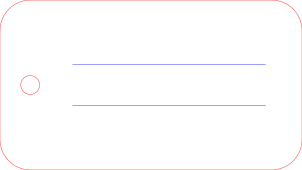
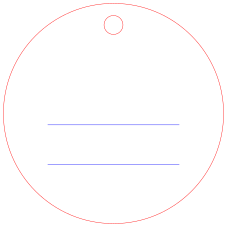
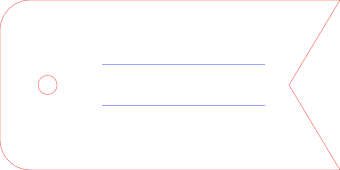
Three tags — rectangular, round and notched — each with a hanging hole and two engraved writing rules.
Gift Tags RECT
Three tags — rectangular, round and notched — each with a hanging hole and two engraved writing rules. Units are millimetres. Red paths cut, blue paths engrave. Free for personal and commercial use, no attribution required. lasercanvas.app
Gift Tags RECT
80 × 45 mm
Download SVG
Gift Tags ROUND
Three tags — rectangular, round and notched — each with a hanging hole and two engraved writing rules. Units are millimetres. Red paths cut, blue paths engrave. Free for personal and commercial use, no attribution required. lasercanvas.app
Gift Tags ROUND
60 × 60 mm
Download SVG
Gift Tags PENNANT
Three tags — rectangular, round and notched — each with a hanging hole and two engraved writing rules. Units are millimetres. Red paths cut, blue paths engrave. Free for personal and commercial use, no attribution required. lasercanvas.app
Gift Tags PENNANT
90 × 45 mm
Download SVG
Cutting it
Suggested material: 3mm plywood, 300gsm card, or 2mm acrylicSize: 80 × 45 mm, 60 × 60 mm, 90 × 45 mmUnits: millimetres. The file imports at true size — no scaling step.Colours: red paths are cut lines, blue paths are engrave lines.
Every hole keeps a 3mm+ web to the edge so the tag does not tear out. Card cuts fastest; plywood lasts.
In LaserCanvas
Download the file, then open LaserCanvas and import it. Assign cut and engrave to the two colours in Prepare, pick your material, and the toolpath preview shows what will happen before anything moves.
Open LaserCanvas →
Licence
These files are free to download, cut, modify, sell and give away, for personal and commercial use, with no attribution required. They are provided as they are, with no warranty — check dimensions and do a test cut before committing good material.
Cut it in your browser
Import the SVG, set your material, and send it to your laser. Nothing to install.
Open LaserCanvas →
 LaserCanvas